

Every device that connects to the internet shows an IP address to the sites it visits. A proxy server sits between your device and those sites, and it changes how that connection looks. People use it for privacy, speed, access control, and data collection online.
This guide explains what proxies are, how they work, which types exist, and how to set one up safely. You will also find clear answers to common questions and honest notes on the risks of each option.
What Is a Proxy Server?
A proxy server is an intermediary computer that sits between your device and the internet. It receives your requests, forwards them to the destination website, and returns the response to you. The website sees the proxy’s IP address instead of yours.
Proxies have been part of network design since the early web. Organizations first used them to cache pages and save bandwidth. Today they also support privacy, security filtering, and large scale data collection.
What Is a Proxy Server in Simple Terms?
In simple terms, a proxy acts like a go between. Think of it as a receptionist who takes your message, delivers it elsewhere, and brings back the reply. The other side talks to the receptionist, not to you. Your identity stays one step removed.
How Does a Proxy Server Work?
A proxy server works by receiving your request, masking your IP address, and sending the request to the target site. The site replies to the proxy, and the proxy passes that reply back to you. Some proxies also filter, cache, or log the traffic.
Here is the usual sequence:
- You type a web address or open an app.
- Your device sends the request to the proxy instead of the website.
- The proxy checks its rules, such as blocked sites or login requirements.
- The proxy forwards the request using its own IP address.
- The website responds to the proxy, which relays the data back to you.
Many proxies also store copies of popular pages. When a second user asks for the same page, the proxy serves the saved copy. This cuts load times and reduces bandwidth costs for companies and schools. Your browser reaches a proxy through a specific address and port, and go to the website and this guide on what a port is and how to find your proxy server in a browser shows how to check both.
Does a Proxy Server Encrypt Your Internet Traffic?
Not by default. A standard proxy forwards traffic without adding encryption, so your privacy depends on the protocol you use. HTTPS sites stay encrypted between your browser and the site, while a basic HTTP proxy leaves plain traffic readable to anyone who controls the proxy.
Some proxies do handle encrypted traffic. An HTTPS proxy creates a tunnel for secure sites but does not read the contents. Corporate gateways may inspect that traffic with installed certificates. A proxy that hides your IP address is not the same as a proxy that protects your data.
What Is a Proxy Server Used For?
Proxies are used to hide IP addresses, filter web content, cache pages, balance server load, test regional content, and collect public web data. Individuals, schools, and businesses all use them, each for different goals. The right use depends on whether you need privacy, control, or speed.
Common uses include:
- Privacy: Masking your IP address from the sites you visit.
- Content filtering: Schools and employers block categories of sites.
- Caching: Storing frequently requested pages to speed up delivery.
- Load balancing: Reverse proxies spread visitors across several web servers.
- Security: Proxies sit in front of servers to absorb malicious traffic.
- Geo testing: Marketers check how ads and pages appear in other countries.
- Web scraping: Companies gather public pricing and search data at scale.
A reverse proxy protects a website, while a forward proxy protects or manages the user. That difference explains most confusion about the term.
What Are the Different Types of Proxy Servers?
Proxies are grouped by direction, anonymity level, protocol, and IP source. The main types are forward, reverse, transparent, anonymous, and high anonymity proxies, plus HTTP, HTTPS, and SOCKS protocols. IP source splits them into residential, datacenter, and mobile proxies.
| Type | Main Purpose | Hides Your IP? |
| Forward proxy | Sends user requests to the internet | Yes |
| Reverse proxy | Protects and balances web servers | Not applicable |
| Transparent proxy | Filters or caches without user setup | No |
| Anonymous proxy | Hides IP but reveals proxy use | Yes |
| High anonymity proxy | Hides IP and proxy use | Yes |
| Residential proxy | Uses real home internet addresses | Yes |
| Datacenter proxy | Uses server farm addresses | Yes |
| Mobile proxy | Uses carrier network addresses | Yes |
Rotating proxies change your IP address after each request or at set intervals. Static proxies keep the same address. Shared proxies split one address among many users, while dedicated proxies give one user exclusive access.
What Is an HTTP or HTTPS Proxy?
An HTTP proxy handles web traffic over the HTTP protocol, while an HTTPS proxy supports secure connections to encrypted sites. Both work at the application layer and understand web requests. They suit browsing, web scraping, and content filtering, but they do not handle every kind of traffic.
An HTTP proxy can read and change headers, which makes caching and filtering possible. An HTTPS proxy typically uses the CONNECT method to open a tunnel to the destination. The proxy sees the destination address but not the encrypted content. Common default ports include 80, 8080, and 3128.
What Is a SOCKS Proxy?
A SOCKS proxy is a general purpose proxy that routes any type of traffic between your device and a server. It does not interpret the data, so it works with email, torrents, games, and browsers. SOCKS5 is the current version and supports authentication and UDP traffic.
Because SOCKS operates at a lower level than HTTP, it is more flexible but offers no built in content filtering or caching. SOCKS proxies usually use port 1080. SOCKS4 lacks authentication and UDP support, so SOCKS5 is the safer choice for most users.
What Is a Residential Proxy?
A residential proxy routes your traffic through an IP address assigned by an internet service provider to a real home. Websites see the request as coming from an ordinary household, so these proxies are harder to detect and block than datacenter addresses.
Residential proxies are popular for ad verification, price monitoring, and sneaker or ticket research. They cost more than other types, usually billed by bandwidth. Speed can vary because the traffic passes through consumer connections. Always confirm that the provider obtains its IP addresses with clear user consent.
What Is a Datacenter Proxy?
A datacenter proxy uses an IP address hosted in a commercial data center rather than at a home. These addresses are fast, cheap, and plentiful. Websites can detect them more easily because the address ranges are publicly linked to hosting companies.
Datacenter proxies work well for tasks that need speed and volume, such as bulk data collection from sites with light protection. They are less suited to sites with strict anti bot systems. Most providers sell them by the IP or by monthly plan, often with unlimited bandwidth.
What Is a Proxy Server Address and Port?
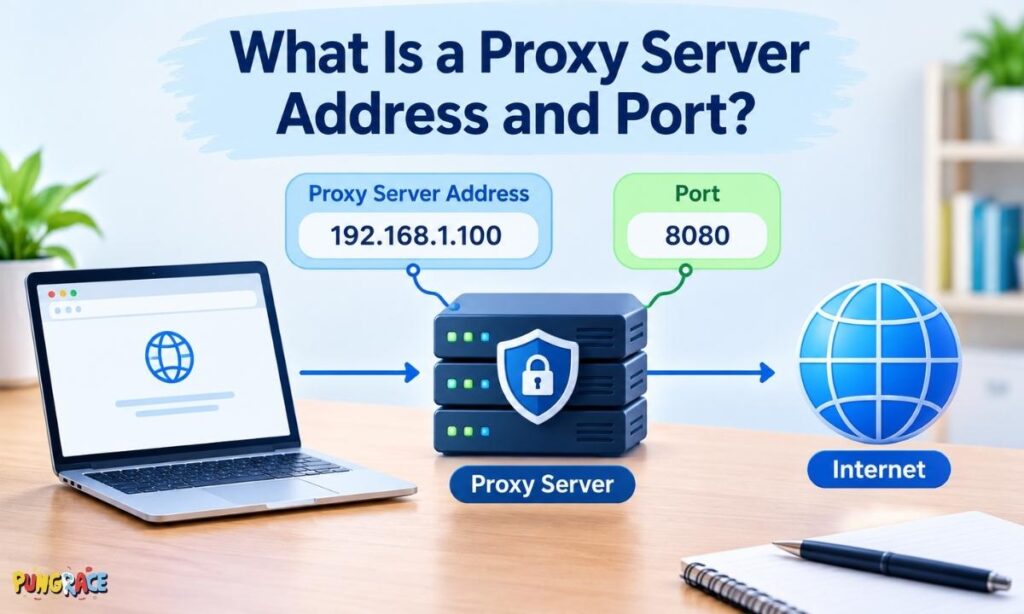
A proxy address identifies where the proxy lives on a network, and the port identifies which door on that machine accepts your traffic. Together they tell your device exactly where to send requests. An example looks like 192.168.1.10:8080.
What Is a Proxy Server Address and How Is It Different From a Proxy Port?
The address is an IP address or hostname, such as proxy.example.com, that locates the proxy. The port is a number, such as 8080, that selects the specific service on that machine. You need both values to connect, and swapping either one causes a failed connection.
Think of the address as a building and the port as a particular office door inside it. Several services can run on one address, each on a different port. Providers also give a username and password when the proxy requires authentication.
How Do I Find My Proxy Server Address?
You can find your proxy address in your device’s network settings, your browser’s connection settings, or your organization’s configuration script. On Windows it appears under Settings, Network and Internet, Proxy. On a Mac it appears in the Network settings under your active connection.
Follow these checks:
- Windows: Open Settings, choose Network and Internet, then Proxy. Look under Manual proxy setup. You can also run netsh winhttp show proxy in Command Prompt.
- macOS: Open System Settings, choose Network, select your connection, click Details, then Proxies.
- Chrome: It uses the operating system settings, so check the steps above.
- Firefox: Open Settings, scroll to Network Settings, and select Settings.
- Workplace or school: Ask your IT team. Many organizations use a PAC file, which is a script that picks the proxy automatically.
If the fields are empty, you are probably not using a proxy.
How Do I Set Up a Proxy Server?
To set up a proxy, collect the address, port, and login details from your provider, then enter them in your operating system or browser settings. Save the changes and visit an IP checking site to confirm the new address appears. Test before using it for sensitive tasks.
On Windows:
- Open Settings and choose Network and Internet.
- Select Proxy and click Set up next to Use a proxy server.
- Turn the switch on and type the address and port.
- Add exceptions for local addresses if needed, then save.
On macOS:
- Open System Settings and select Network.
- Choose your connection and click Details, then Proxies.
- Select the protocol, such as Web Proxy (HTTP) or SOCKS Proxy.
- Enter the address, port, and credentials, then click OK.
In Firefox: Open Network Settings, choose Manual proxy configuration, and enter the details. Firefox keeps its own proxy settings separate from the system, which is useful for testing.
Browser extensions can also switch proxies quickly. Whichever method you choose, use a trusted provider and avoid entering personal accounts while testing.
Should My Proxy Server Be On or Off?
Keep your proxy on only when you need it and have confirmed it comes from a source you trust. If you do not use one on purpose, it should be off. An unexpected proxy setting can signal malware that reroutes your traffic.
When Should You Turn a Proxy Server On or Off?
Turn it on when your workplace or school requires it, or when you intentionally use a trusted proxy for privacy or regional testing. Turn it off when you have no proxy provider, when websites fail to load, or when you see a setting you did not create.
A simple habit helps: check your proxy settings after installing unknown software. Security researchers regularly report malware that quietly changes these settings to intercept browsing. If the setting appears and you never added it, switch it off and run a security scan.
What Are the Benefits of Using a Proxy Server?
The main benefits are IP masking, faster repeated page loads through caching, content control, added protection for servers, and access to region specific content for testing. Businesses also gain better visibility into web usage. The value depends on the proxy type and provider quality.
Key advantages include:
- Privacy: Websites see the proxy address, not yours.
- Speed: Cached content loads quicker and saves bandwidth.
- Control: Administrators can block or allow categories of sites.
- Security: Reverse proxies shield origin servers from direct attacks.
- Scale: Rotating proxies spread requests across many addresses.
- Testing: Teams view localized pages without traveling.
What Are the Risks of Using a Proxy Server?
The biggest risks are data exposure, malicious operators, weak or missing encryption, and slow or unreliable service. A proxy can see and record unencrypted traffic, so an untrustworthy provider can read or sell what you send. Free services carry the highest risk.
Watch for these issues:
- Logging: Providers may store your browsing history and sell it.
- Injected ads or malware: Some free proxies alter the pages you receive.
- Credential theft: Unencrypted logins can be captured.
- Poor uptime: Overloaded shared proxies slow down or disconnect.
- False sense of safety: Hiding an IP does not stop tracking through cookies or accounts.
Choose paid providers with a clear privacy policy, and never log into banking or email through an unknown proxy.
Proxy Server vs VPN: What Is the Difference?
A VPN encrypts all traffic from your device and routes it through a remote server, while a proxy server usually redirects only specific app or browser traffic without encryption. A VPN offers stronger privacy at the system level. A proxy offers flexibility, speed, and lower cost.
| Feature | Proxy | VPN |
| Encryption | Usually none | Yes, full tunnel |
| Scope | One app or browser | Entire device |
| Speed | Often faster | Slightly slower due to encryption |
| Best for | Scraping, testing, filtering | Privacy on public networks |
| Cost | Free to moderate | Usually a monthly fee |
Is a Proxy Server the Same as a VPN?
No. Both change the IP address that websites see, but a VPN also encrypts your connection and covers every app on your device. A proxy generally forwards requests without encryption and works only where you configure it.
Choose a VPN when you want private browsing on public Wi-Fi. Choose a proxy when you need location control, automation, or per app routing.
How to Choose the Right Proxy Server
Match the proxy to the task. Pick residential for sites with strong bot detection, datacenter for fast bulk work, SOCKS5 for mixed traffic, and HTTPS for secure browsing. Then compare provider reputation, pricing, location coverage, and support before you commit to a plan. A proxy server that fits your task will save money and time.
Use this checklist:
- Define the goal: Privacy, scraping, filtering, or testing.
- Check the protocol: HTTP, HTTPS, or SOCKS5.
- Review the IP source: Residential, datacenter, or mobile.
- Confirm locations: Make sure your target countries are covered.
- Read the policy: Look for a no logging statement and ethical sourcing.
- Test first: Use a trial or small plan to measure speed and success rates.
Avoid providers that hide ownership or offer unlimited premium access for almost nothing.
Common Proxy Server Problems and Solutions
Most proxy errors come from wrong address or port values, expired credentials, blocked IPs, or conflicting settings. Checking the details and testing another connection solves the majority of cases. The table below lists frequent errors and quick fixes.
| Problem | Likely Cause | Fix |
| Proxy server is not responding | Wrong address, port, or server down | Recheck details and test another proxy |
| Pages will not load | Proxy blocked or overloaded | Switch to a different IP |
| 407 error | Authentication required | Enter valid username and password |
| Site shows CAPTCHA | Flagged datacenter IP | Try a residential proxy or slower requests |
| Slow speeds | Shared proxy or distant location | Choose a closer or dedicated proxy |
| Settings reappear after removal | Malware or a policy rule | Run a security scan and check with IT |
Proxy Server FAQs
What Is a Proxy Server in Simple Terms?
It is a middleman between you and the internet. Your request goes to the proxy first, and the proxy contacts the website for you. The site sees the proxy’s details instead of your device, which adds a layer of separation and control.
What Does a Proxy Server Do?
A proxy server receives your web requests, forwards them to the destination, and returns the reply. Along the way it can hide your IP address, filter content, store copies of pages, record activity, or balance traffic across several machines, depending on how it is configured.
Does a Proxy Server Hide Your IP Address?
Yes, in most cases. Websites see the proxy’s IP address instead of yours. A transparent proxy is the exception, since it passes your original address along. Hiding the IP does not stop tracking through cookies, browser fingerprints, or logged in accounts.
Is a Proxy Server the Same as a VPN?
No. A VPN encrypts all device traffic and creates a private tunnel to a remote server. A proxy typically routes selected traffic only and adds no encryption. Proxies suit targeted tasks, while VPNs suit broad privacy needs, especially on public networks.
Is It Safe to Use a Proxy Server?
It can be safe with a reputable paid provider, HTTPS sites, and a clear privacy policy. It is unsafe with unknown operators who may log or alter your data. Never send passwords or payment details through a proxy you do not trust.
Are Free Proxy Servers Safe?
Usually not. Free proxies often earn money by logging activity, injecting ads, or selling data. They also tend to be slow and unreliable. If you must try one, avoid logins and personal information, and use it only for harmless browsing tests.
How Do I Find My Proxy Server Address?
Open your network settings. On Windows go to Network and Internet, then Proxy. On a Mac open Network, choose your connection, and select Proxies. Browsers like Firefox have their own section under Network Settings. Workplaces may use a PAC file instead.
What Is a Proxy Port?
A proxy port is a number that tells your device which service on the proxy machine should receive your traffic. Common examples are 8080 and 3128 for HTTP proxies and 1080 for SOCKS. You must enter the correct port along with the address.
Should My Proxy Server Be On or Off?
Leave it off unless you deliberately use one or your organization requires it. A proxy you did not set up may indicate malware. Switching it off restores a direct connection, and a security scan can confirm whether anything changed your settings.
Can I Use a Proxy Server With Chrome?
Yes. Chrome follows your operating system’s proxy settings, so you configure the proxy in Windows or macOS network settings. You can also install a proxy manager extension to switch between proxies without changing system wide values.
Can I Use a Proxy Server With Firefox?
Yes. Firefox has its own connection settings. Open Settings, find Network Settings, choose Manual proxy configuration, and enter the address and port. This lets you route only Firefox through the proxy while other apps use your normal connection.
Does a Proxy Server Make You Anonymous?
Not fully. A proxy masks your IP address, but websites can still identify you through cookies, logins, and browser fingerprints. The provider may also see your activity. True anonymity needs several steps, including careful account habits and often stronger tools.
Final Thoughts on Proxy Servers
Proxies are flexible tools. They can hide your address, speed up repeated requests, filter content, and protect busy websites. They do not encrypt traffic by default, and a poor provider can expose more than it protects. Knowing the difference between types helps you avoid costly mistakes.

Matthew is a creative writer with 4 years of experience crafting engaging blessing and pun-based blogs. He now brings joyful wordplay, positivity, and thoughtful humor to Pungrace.com, inspiring smiles and meaningful moments through every line he writes.